Facebook-Data-Extractor
Facebook Data Extractor
Web-based Facebook groups scraper that opens Chrome, searches groups, extracts posts, and exports CSV.
Quick Start
For the full startup flow, see:
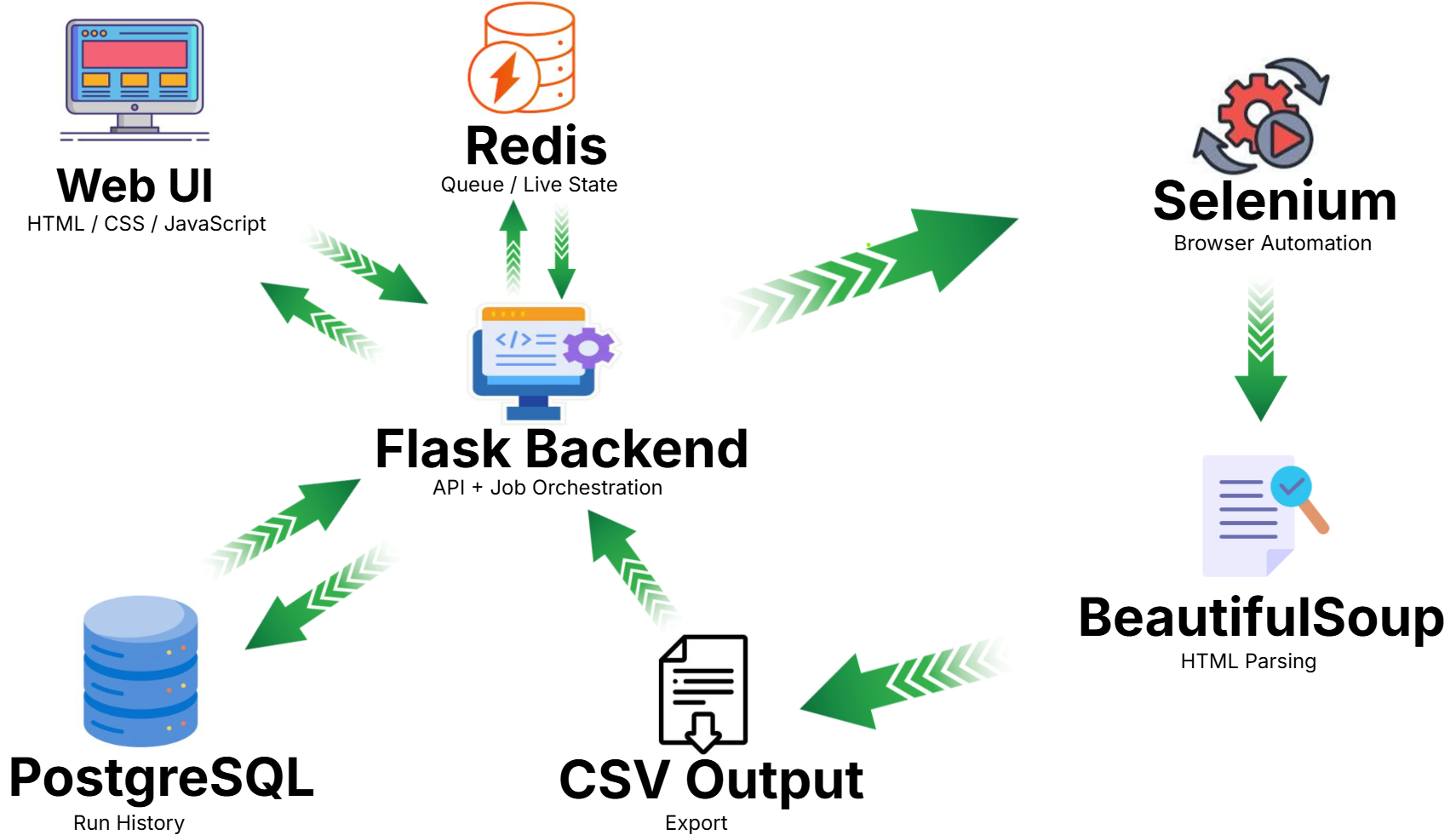
System Flow
What This Project Does
- Searches Facebook groups by your search phrase
- Enables
Public groupsfilter before collecting links - Collects posts from groups and writes CSV rows with:
AuthorPost TimeContentPost Link
- Provides a modern web UI to run, stop, monitor progress, and download CSV
Who Needs Installation?
- End users (people you send the link to): no installation needed.
- Only the host machine (your PC/server): needs Docker Desktop and project setup.
Host Requirements
- Windows
- Docker Desktop
- Internet connection
- A Facebook account available on the machine running the scraper
Run with Docker (Recommended)
docker compose up --build -d
Open:
http://localhost:5000
For Facebook login inside the Selenium browser container, open:
http://localhost:7900
The noVNC password is disabled for local development in the current compose file.
requirements.txt is still required because the Docker image for the Flask app installs Python packages from it during build.
Docker Services
app- Flask web appredis- queue and live job statepostgres- persistent run historyselenium- Chrome browser automation
If you expose this app with ngrok, users open the ngrok URL in their browser and use it directly. They do not install Python, ChromeDriver, Docker, or this repository.
Web UI Features
Runstarts a new scraping jobStopstops your own current jobProcess Timelineshows user-friendly progress logsDownload CSVbecomes active when run is completeClearclears timeline logs for your jobMy Runsshows your own run historyDeleteremoves a specific saved run and its CSVDelete Allremoves all saved runs and CSV files for the current browser user
Queue Behavior (Important)
- Only one scraping run can execute at a time on one machine (one Chrome automation session).
- If another user starts while a run is active, the new run is queued.
- Each browser gets its own
client_id, and users can control only their own jobs. - The project now supports storing queue and job state in
Rediswhen configured.
Docker Notes
Redisstores queue and live job statePostgreSQLstores persistent run history- default cleanup removes:
- Redis terminal jobs older than
48hours - PostgreSQL run history older than
30days
- Redis terminal jobs older than
Seleniumexposes:4444for WebDriver7900for noVNC browser access
Input Fields
Search in Facebook
Phrase sent to Facebook search.
Group links number
Requested number of groups to process.
Posts from each group
Requested number of posts per group.
Expected rows =
group_links_number * posts_from_each_group(best effort, based on available data and page behavior).
Output
- Web mode: files are created under
web_outputs\facebookposts-<job_id>.csv - Download endpoint serves the result as
facebookposts.csv
Share with Others (ngrok)
If you want to share a temporary public link to your local app:
- Run the app:
docker compose up --build -d
- Run ngrok to expose port 5000:
ngrok http 5000
- Send the
https://...ngrok...URL.
What End Users Need
- Only the link
- A browser
- No local installation
ngrok Notes
- The scraping still runs on your machine.
- Remote users trigger jobs on your Dockerized local server and Selenium browser.
- If your machine/app is off, the link will not work.
- If multiple users run at the same time, jobs are queued (one active run at a time).
Troubleshooting
Push blocked by GitHub secret scanning
Do not commit browser profile/cache/history folders (web_profiles/** should be ignored).
If sensitive data was already committed, rewrite history and rotate exposed credentials.
ngrok not recognized
Make sure ngrok is installed and in PATH, or run the full executable path.
Chrome/FB login behavior
When Facebook login is required, use:
http://localhost:7900
That page shows the Selenium browser through noVNC so you can log in manually when needed.